




Cataloging
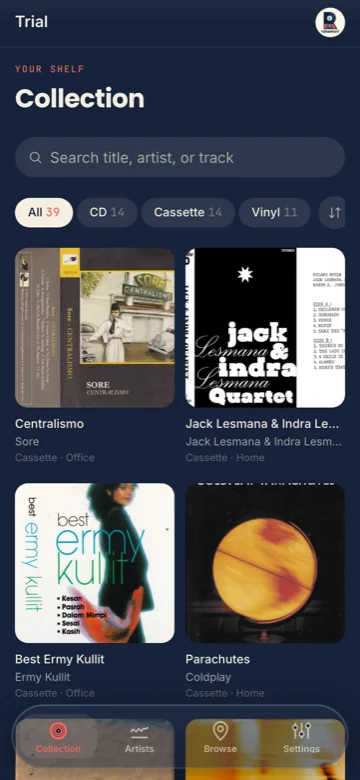
01Every CD, cassette, record, and book in one place. Add items by hand, or let the details fill themselves in.
 Private catalog
Know what you have, and where it is.
Rakemori is a private catalog for your CDs, cassettes, vinyl, and books. It keeps track of where each one is, who borrowed it, and what you've added or let go.
Scan a record and every track gets a play button before you save. The 30-second clips come from iTunes and Deezer, so you can check the match is right before it lands in your library. The play buttons stay on the tracklist afterwards.
Every CD, cassette, record, and book in one place. Add items by hand, or let the details fill themselves in.
Scan a barcode or search by title and artist. Cover art and tracklists come from Discogs, Open Library, and Google Books.
Build a nested map of where things live, from the house down to the shelf it sits on.
Share your library read-only, and keep a record of what's on loan and to whom.
Point your camera at a barcode, or search by title and artist. The cover art and tracklist come back filled in, with a play button on every track.
It lands in your library. Edit anything or add a note; it's your record now.
Tag where it lives, down to the shelf or the box, so you can find it later.
Build a location tree as deep as your home is: house, room, shelf, crate. Every item points to exactly where it sits, so you know where to put it back.
Your library is private and belongs to you. You decide whether anyone else ever sees it.
CDs, cassettes, vinyl records, and books, all in the same library.
Cover art, tracklists, and metadata come from Discogs, Open Library, and Google Books.
Only if you share it. Shared links are read-only and can be revoked whenever you like.
Yes. Sign up with your Google account, or ask for a username and password. Your library is private either way, and only you can open it.
Mark an item as on loan and to whom; the full borrowing history stays with the record.
It leaves your active shelves but stays in your history, so you always know what you once had.
Yes. Rakemori is on Google Play for Android, and it works in any browser on the phone or desktop. The iPhone app is on its way to the App Store. Same account, same library.
The Android app carries your whole catalog to the shelf you are standing in front of, with the barcode scanner one tap away. It signs in to the same library you use on the web.
For phones without the Play Store. Android asks for permission before it installs, and you come back here when there is a new version.
https://rakemori.com/altstore.jsonPaste this into AltStore's Sources tab. AltStore signs the app with your own Apple ID, so the first install needs a computer running AltServer, and a free Apple ID has to refresh it every seven days. Links to rakemori.com open in Safari rather than in the app.
Step-by-step install guide →App Store · coming soon